

Rainy Mood 
Section titled “Rainy Mood ”Music Assistant has support for Rainy Mood. This component is contributed and maintained by jlpouffier.
This source offers the rain ambience from rainymood.com as a sound effect. It can be played directly like any other item, or used as the source for the queue audio overlay feature to mix the sound of rain underneath the music.
Features
Section titled “Features”| Subscription FREE | Yes |
| Self-Hosted Local Media | No |
| Media Types Supported | Sound Effects |
| Recommendations Supported | No |
| Lyrics Supported | No |
| Endless Mix | No |
| Artist Top Tracks Support | No |
| Similar Artists Support | No |
| Similar Tracks Support | No |
| Maximum Stream Quality | MP3 128kbps |
| Login Method | None |
Included sounds
Section titled “Included sounds”| Sound | Description |
|---|---|
| Rain | Looping rain ambience from rainymood.com |
- The sound is streamed from rainymood.com, it is not generated or stored locally
- Can be used as the audio overlay source for a queue, mixing the sound of rain underneath the music
Configuration:
Section titled “Configuration:”- Go to Settings → Music Sources → Add a music source and select
Rainy Mood - There is nothing to configure, no account is needed
The rain sound is not added to the library and does not show up in search. It can be found by browsing:
- Go to Browse in the main menu
- Open Rainy Mood
From there it can be played directly on any player, just like a track.
Using Rainy Mood as audio overlay
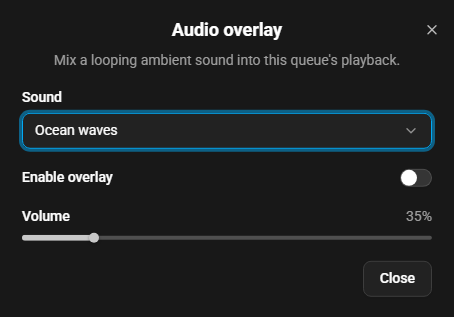
Section titled “Using Rainy Mood as audio overlay”The audio overlay mixes a looping sound effect into the audio of a queue while the music keeps playing. It is enabled by an option in the settings of the Now Playing view. Pick the Rainy Mood rain sound as the overlay source for a queue and set the overlay volume (relative to the music) to taste. Changes take effect immediately. When the queue is playing, playback restarts from the current position so the change is heard right away instead of after the player’s buffer has drained.
Note that enabling the overlay forces the queue into flow mode, because the overlay has to keep playing across track boundaries.
Known Issues / Notes
Section titled “Known Issues / Notes”- Support for Rainy Mood is still experimental, please report if you experience any issues or unexpected behaviour
- An internet connection to rainymood.com is required, the sound is not available offline
- The rain sound cannot be favorited or added to a playlist
- While the audio overlay is active, the queue always plays in flow mode. Players that rely on per-item playback features will behave accordingly
- If the overlay source cannot be resolved or its stream fails, playback continues without the overlay rather than stopping the music
- For locally generated noise and ocean wave loops, see Ambient Sounds
This website uses privacy-first analytics to help us improve the site. You can view all data in our public dashboard.