

Music Assistant Desktop App
Section titled “Music Assistant Desktop App”



The desktop app for Music Assistant!
Available for macOS, Windows, and Linux (Debian, AppImage, or RPM; for both x64 and ARM).
Download the latest release here
TIP
This is still in very early alpha. Bugs will be present.
Please help finding them. You can report any bugs on the Discord server or in the repo issues
When starting the app for the first time you are asked for some information about the Music Assistant Server.
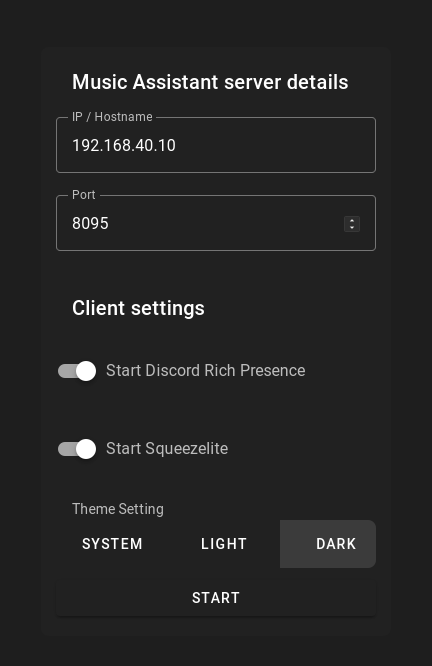
Features
Section titled “Features”- Native Audio Playback - High-quality audio output via Sendspin, MA’s own streaming technology, with selection of the output device
- System Tray Integration - Control playback and see what’s playing from the system tray
- OS Media Controls - Integrates with macOS Control Center, Windows Media Controls, and Linux media controls (MPRIS)
- Discord Rich Presence - Show what you’re listening to on Discord
- Server Discovery - Finds your Music Assistant server automatically on your network
Like the Spotify app, the Music Assistant app can do Discord Rich Presence.
Example of Discord Rich Presence:
!Example of Discord Rich Presence
Installation
Section titled “Installation”Windows
Section titled “Windows”You can download the .msi installer from the releases.
You can download the .dmg from the releases.
Debian (and Debian based distributions)
Section titled “Debian (and Debian based distributions)”You can download the .deb from the releases.
All the other Linux distros
Section titled “All the other Linux distros”You can download the AppImage from the releases.
This website uses privacy-first analytics to help us improve the site. You can view all data in our public dashboard.