

Bandcamp Music 
Section titled “Bandcamp Music ”Music Assistant has support for Bandcamp. Contributed and maintained by ALERTua and teancom
Bandcamp is a shop and streaming site where artists and labels publish their own music and sell it directly to listeners. Most of the catalogue can be streamed for free before you decide to buy.
This source lets you search and play that catalogue from Music Assistant. Add your account cookie as well and the albums you have bought come across as a library of their own.
CAUTION
DISCLAIMER Please note that Bandcamp does not offer an official API to retrieve data and streams. This means that everything is built on a best-effort basis.
NOTE
You can search and play without signing in. To bring across the albums you have bought, you need to add your identity cookie as described below.
Features
Section titled “Features”| Subscription FREE | Yes |
| Self-Hosted Local Media | No |
| Media Types Supported | Artists, Albums, Tracks |
| Recommendations Supported | No |
| Lyrics Supported | Yes |
| Endless Mix | No |
| Artist Top Tracks Support | Yes |
| Similar Artists Support | No |
| Similar Tracks Support | No |
| Maximum Stream Quality | MP3 128kbps |
| Login Method | None or Cookie |
- Searching the Bandcamp catalogue
- The highest available stream from Bandcamp will be selected for playback
- Bandcamp Feed and Wishlist are available in the browse view
Configuration
Section titled “Configuration”- Providing an identity cookie is optional, but allows importing owned albums as library items
- Enable “Fetch song lyrics” to get lyrics from Bandcamp
- Tweak Top Tracks Limit to balance search speed and quantity of search results
NOTE
Cookies may expire after some time. This means that you may have to replace the identity cookie in the provider configuration if library synchronization begins to fail.
Obtaining the Identity Cookie
Section titled “Obtaining the Identity Cookie”-
Open Bandcamp in your browser.
-
Open the cookies storage via View -> Developer -> Developer Tools -> (Application) -> Storage -> Cookies ->
https://bandcamp.com. Note that this might be named differently based on your browser. It should open a window similar to this: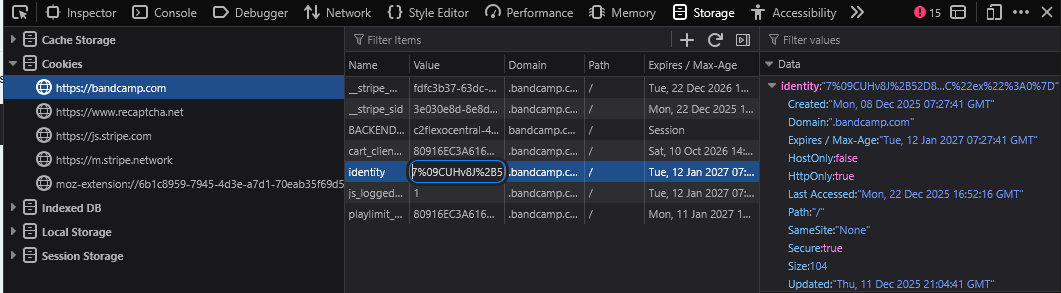
-
Find
identitycookie -
Double-click its value and copy its contents
Configuring the provider
Section titled “Configuring the provider”- Navigate to ‘Settings’
- Under Music Sources, click ‘Add a music source’, select ‘Bandcamp’, and fill in the identity cookie if needed
- Change optional values
- Click ‘Save’
Known Issues / Notes
Section titled “Known Issues / Notes”- This provider mimics Bandcamp. Do not expect to see the same search results as you would when using Bandcamp itself
- Large labels are slow to load: a label with hundreds of albums can take several minutes to appear, because Bandcamp limits how fast anything can read from it. Music Assistant has to pause between requests or Bandcamp will block it altogether. The log will show “Bandcamp rate limit reached” while this is going on, which is expected rather than a fault.
Artists, Labels, and Search
Section titled “Artists, Labels, and Search”Bandcamp uses the term artist for any page on bandcamp.com — a performing artist, a band, a label, or a collective.
A label’s page hosts albums by various performers, and those performers may not have their own Bandcamp page.
This Provider mirrors this directly.
What this means in practice:
- Artist search returns pages, not performers. A performer without their own Bandcamp page will not appear in artist search results. To find their releases, search by album name, or by the label that hosts them
- A label’s page lists every album on it, regardless of the credited performer
- Names can collide. The same name may exist as both a standalone artist page and as a credited performer on a label-hosted album (e.g. Apollo Brown on their own page vs. on Hip Dozer compilations). These are distinct entries on Bandcamp and will appear separately
- Track and album metadata is correct. The credited performer is what’s displayed in the player and scrobbled, even when the parent page is a label
This website uses privacy-first analytics to help us improve the site. You can view all data in our public dashboard.