

SoundCloud 
Section titled “SoundCloud ”Music Assistant has support for Soundcloud. Contributed by gieljnssns. Maintained by robsonke
SoundCloud is a site where anyone can upload and share audio, so a great deal of what is on it comes straight from the artist. It is where DJ mixes, remixes, demos and music that has not been released anywhere else tend to turn up.
Connecting your account puts what you have liked and followed on SoundCloud into Music Assistant, with the wider catalogue there to search.
Features
Section titled “Features”| Subscription FREE | Yes |
| Self-Hosted Local Media | No |
| Media Types Supported | Artists, Albums, Tracks, Playlists |
| Recommendations Supported | No |
| Lyrics Supported | No |
| Endless Mix | No |
| Artist Top Tracks Support | Yes |
| Similar Artists Support | No |
| Similar Tracks Support | Yes |
| Maximum Stream Quality | AAC 256kbps |
| Login Method | Cookie |
Configuration
Section titled “Configuration”SoundCloud has no sign-in for outside apps, so two values have to be copied out of your browser while you log in. You need a Client id and an Authorization.
- Clear your SoundCloud cookies, so that logging in again produces the requests you need to see
- Go to SoundCloud but do not log in yet
- Press F12 to open your browser’s developer tools, and go to the Network tab
- Now log in. A long list of entries will appear
- Type
authin the filter box to narrow the list down - Look through those entries for
client_id. It is a run of 32 letters and numbers. Copy it - Now find the
oauth_tokencookie for soundcloud.com and copy its value. In Music Assistant this goes in the Authorization field withOAuthtyped in front of it, including the space
The screenshots below show where each of these appears.
Client id
Section titled “Client id”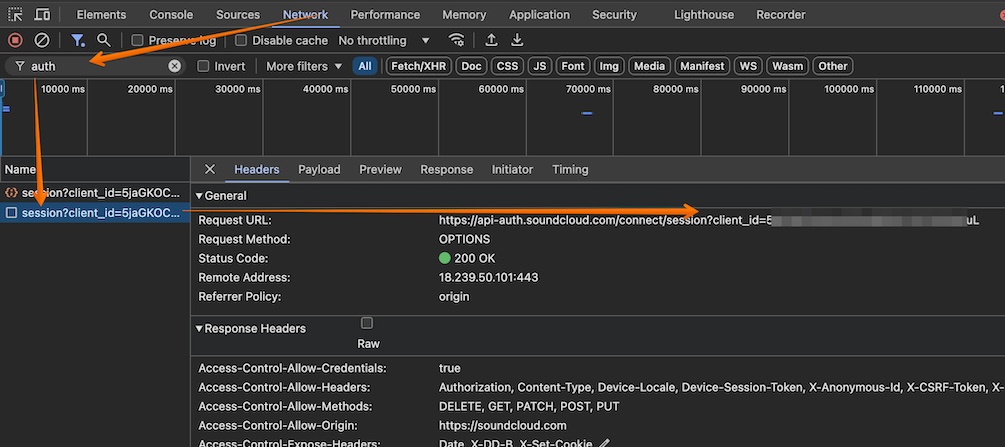
OAuth token
Section titled “OAuth token”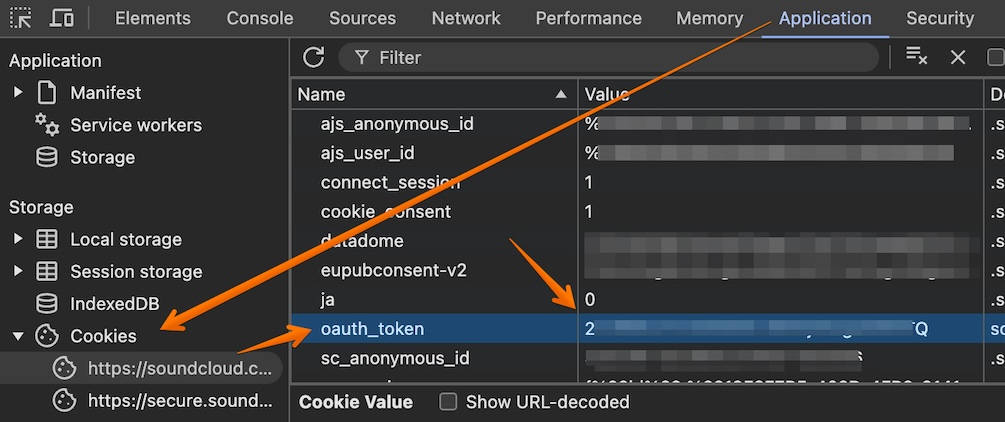
Filled in, the two fields should look like this. These values are made up — use your own:
client_id = 5Hvc9wa0Ejf092wj3f3920w3F920asuLAuthorization = OAuth 2-26432-21446-asdif2309fQIMPORTANT
Ensure that OAuth is added to the start of the token otherwise login will fail with unexpected mimetype errors
Known Issues / Notes
Section titled “Known Issues / Notes”- What SoundCloud calls an artist is really whoever holds the account, so that is what appears as the artist in Music Assistant. If someone else uploads a track by an artist, it will be filed under the uploader rather than under the artist
This website uses privacy-first analytics to help us improve the site. You can view all data in our public dashboard.