

Builtin Provider 
Section titled “Builtin Provider ”The Builtin provider supports manually adding track and radio station URLs to the database and it also generates various Playlists.
Features
Section titled “Features”- You can add tracks accessible via URL or any online station. You can also add your locally created stations using, for example, Icecast.
Settings
Section titled “Settings”For each of the builtin playlists there is a toggle to enable or disable them.
This provider is added automatically and cannot be disabled or deleted.
Adding Items
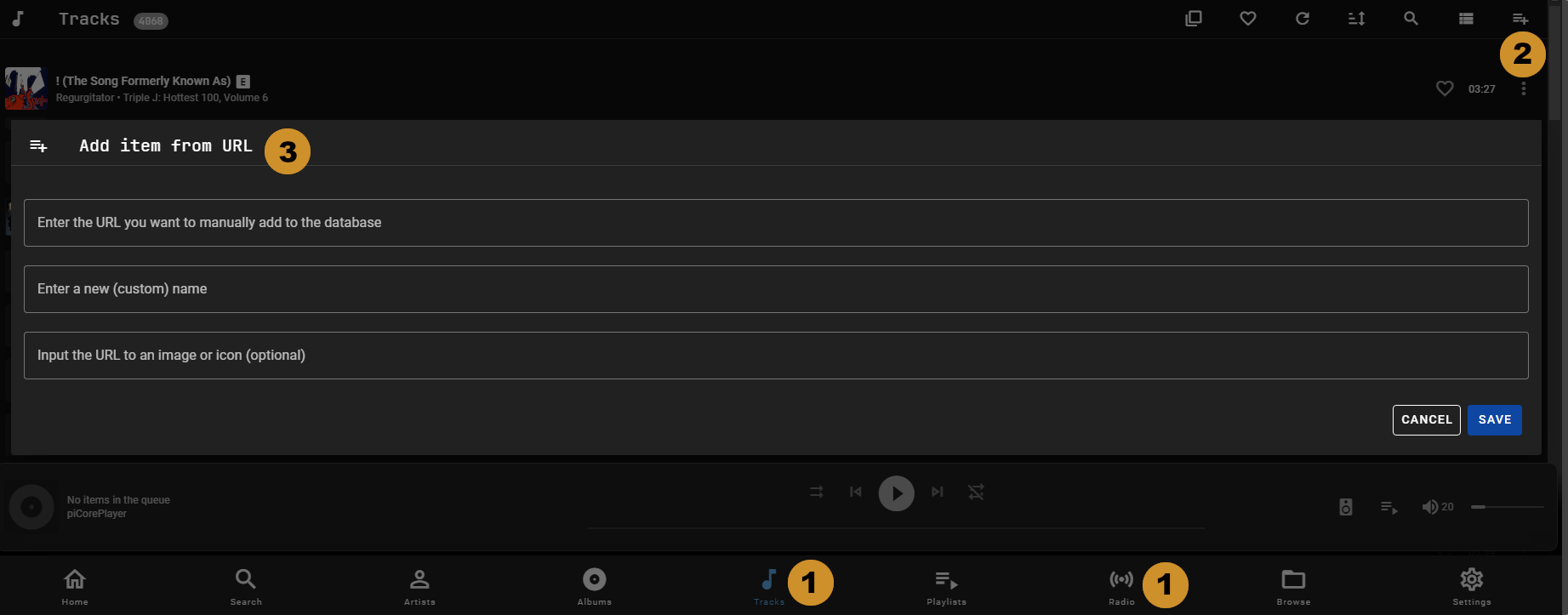
Section titled “Adding Items”To manually add items follow these steps:
-
In the main menu select Tracks or Radio. Playlists are added with Import playlist in the ⋮ menu of the Playlists view instead, see Importing and Exporting
-
Open the ⋮ menu in the top right and select Add item from URL
-
Add the full URL including http:// or https:// and optionally a custom name and image URL, then select Add (or Cancel to close the dialog). For playlists, select the playlist file from the dialog box.
After completing step 3 the track, station or playlist will become available in the respective view (A press of the refresh icon  may be required).
Editing Items
Section titled “Editing Items”The custom name and image URL can be changed by navigating to the detail page for the item and then opening the ⋮ menu in the top right and selecting EDIT <ITEM> where <ITEM> is Track, Playlist or Radio Station.
The URI cannot be changed. If that is required then the existing item must be removed from the library and the new one added.
This website uses privacy-first analytics to help us improve the site. You can view all data in our public dashboard.