

MA get_library Action
Section titled “MA get_library Action”NOTE
This action is used from Home Assistant scripts and automations and requires the Home Assistant integration. See Home Assistant scripts and automations for examples.
This action allows you to retrieve the full details of the items from the library
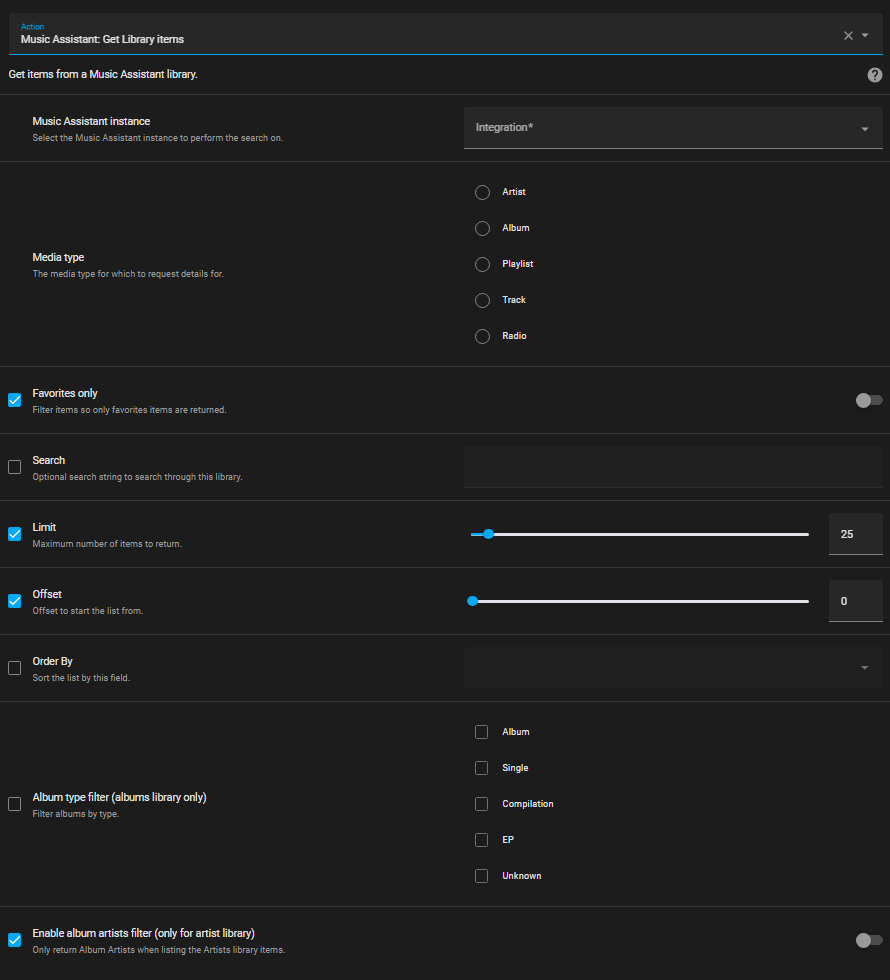
As can be seen there are a large number of filter options available.
The favorite option works in three ways:
- If the option is unchecked on the left then favorites and non-favorites will be returned
- If the option is checked on the left but the switch on the right is off then only non-favorites will be returned
- If the option is checked on the left but the switch on the right is on then only favorites will be returned
The returned JSON is extensive. The returned data can be used in templates.
Example
Section titled “Example”In this example a queue of 10 random tracks is created.
script: create_random_queue: mode: single sequence: - service: music_assistant.get_library data: limit: 10 media_type: track config_entry_id: 01JEXNDHT21V0BHJXM7A5SZANV order_by: random response_variable: random_tracks - repeat: count: "{{ random_tracks['items'] | length }}" sequence: - action: music_assistant.play_media data: media_id: "{{ random_tracks['items'][repeat.index - 1].uri }}" media_type: track enqueue: add target: entity_id: media_player.ma_kitchen_speakerNOTE
Replace the config_entry_id value with the one for your own MA integration; the example above will not work as-is. The easiest way to get yours is to build the action once with the UI editor in Home Assistant’s Developer Tools > Actions and then switch to YAML view.
This website uses privacy-first analytics to help us improve the site. You can view all data in our public dashboard.